Any MaxxECU can be used as a standalone 8HP controller, but there are a few things to keep in mind:
1. Potential CAN collisions if connected to the vehicle CAN..
2. Whether you are using the OE ECU (or another aftermarket ECU) as the engine control unit.
Using MaxxECU as a standalone 8HP transmission controller in modern CAN-equipped vehicles may cause CAN collisions.
Note: If you have a fully built race car with no instrument cluster, ABS, or other CAN modules connected to MaxxECU, this does not affect you.
If you have a modern vehicle with an advanced vehicle CAN system and intend to retain the instrument cluster, ABS, steering wheel controls, and other CAN modules, you will most likely experience CAN collisions. This can result in improper transmission shifting, fault codes, and overall malfunction.
See our CAN list for known CAN collisions. If your vehicle is not listed, issues are still likely to occur.
You can use the built-in CAN Analyzer tool to scan your vehicle and compare the results with our CAN list, where all supported 8HP CAN configurations are specified.
For modern vehicles with extensive CAN traffic, the safest way to use MaxxECU as a standalone 8HP controller is to wire the required signals directly to the MaxxECU inputs.
Refer to the table below for the required signals.
Using MaxxECU as a standalone 8HP transmission controller with an OE ECU (stock ECU / ECM /PCM) as the engine control
Example original equipped (OE / OEM) stock engine mananagement (stock ECU / ECM / PCM): Bosch, Denso, Siemens, Continental, Marelli, Hitachi, Delphi, Ford, GM E38, GM E67, GM E92, EDC, MED, MEVD, MG1, MD1
The MaxxECU 8HP control protocol is designed to control both the engine and the transmission for optimal performance and integration.
It is entirely possible to use MaxxECU as a standalone 8HP controller; however, the 8HP transmission requires torque reduction on request. These torque reduction requests are generated by the transmission and sent internally to MaxxECU.
When using MaxxECU as a standalone 8HP controller and operating above approximately 400 HP, torque reduction during upshifts is required. Throttle blipping is not required for basic 8HP operation, but for faster and smoother downshifts, rev-matching is recommended.
Using MaxxECU as a standalone 8HP transmission controller with another aftermarket engine ECU
Example aftermarket Engine control units (ECU): AEM, ECUMaster, Link, Haltech, Fueltech, MoTeC, Emtron, Megasquirt, Syvecs or Holley EFI.
The MaxxECU 8HP control strategy is designed to control both the engine and the transmission from a single unit. This configuration provides the highest level of performance, speed, and accuracy.
It is technically possible to use another aftermarket ECU for engine control and run MaxxECU as a standalone 8HP controller.
Note: We support this control strategy from a functionality standpoint. However, we do not provide technical support, troubleshooting, or documentation for setups involving third-party engine management systems.
If used regardless, the following requirements apply:
•The engine ECU must transmit all required engine data to MaxxECU.
•MaxxECU must be calibrated to match the engine ECU data, including torque modeling and sensor scaling.
•A custom CAN communication protocol must be implemented to allow the engine ECU to perform torque reduction and throttle blipping on request.
Transmission Swaps in Modern Vehicles with an OE ECU (stock ECU / ECM / PCM)
Replacing the automatic transmission in a modern CAN-equipped vehicle requires OE TCU communication. This is not supported unless explicitly stated for the specific OEM CAN Protocol.
Needed for the 8HP protocol to work
•Populated and accurate torque table, indicating true engine torque.
•Engine RPM.
•Brake pedal/stop light active.
•Throttle Position.
•Intake air temperature.
•Coolant temperature.
•Battery voltage.
•Actual revlimit set in system.
•ECU runtime.
•Optional: Transbrake hold button and Transbrake bump/creep button.
Note: MaxxECU does not need to control the engine for 8HP control to function. Torque reduction is mandatory for proper upshifts; without it, shifts will be slow and sluggish. Do not use with OE ECUs unless engine torque reduction is available on demand.
Standalone controller examples
Note: This is possible; however, for optimal performance and drivability, MaxxECU should control both the engine and the transmission.
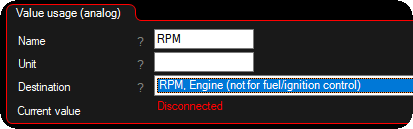
Example how to setup RPM from a CAN message using CAN Inputs.
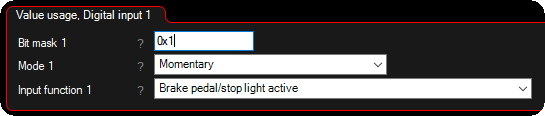
Example how to get brake pedal switch from CAN using CAN Inputs.